쿠팡 파트너스 상품을 블로그에 자동 노출하는 방법을 소개합니다. API 키 설정, Apps Script 활용, 실시간 상품 업데이트 자동화까지 자세히 안내합니다.
블로그를 운영하면서 쿠팡 파트너스 수익을 올리기 위해 매번 상품 링크를 일일이 검색하고 삽입하는 일이 번거롭고 시간 낭비처럼 느껴지셨다면, 이 글이 바로 해답이 될 수 있습니다. 특히 콘텐츠가 많아질수록 수동 작업의 한계는 분명해지기 마련이죠.
오늘은 Google Apps Script를 활용해 쿠팡 파트너스 상품을 자동으로 불러와 블로그에 노출하는 방법을 소개합니다. 이 방식은 한 번만 설정하면 최신 쿠팡 상품 정보가 실시간으로 업데이트되며 자동 반영되기 때문에, 매번 새로 삽입할 필요 없이 꾸준한 수익 창출과 관리 효율성을 동시에 잡을 수 있습니다.
블로그 수익 자동화, 쿠팡 API 기반 실시간 상품 업데이트, 그리고 반응형 디자인 적용까지, 지금부터 소개할 방법은 쿠팡 파트너스를 활용한 블로그 운영에 있어 꼭 필요한 전략이 될 것입니다.
쿠팡 파트너 자동 광고 적용방법
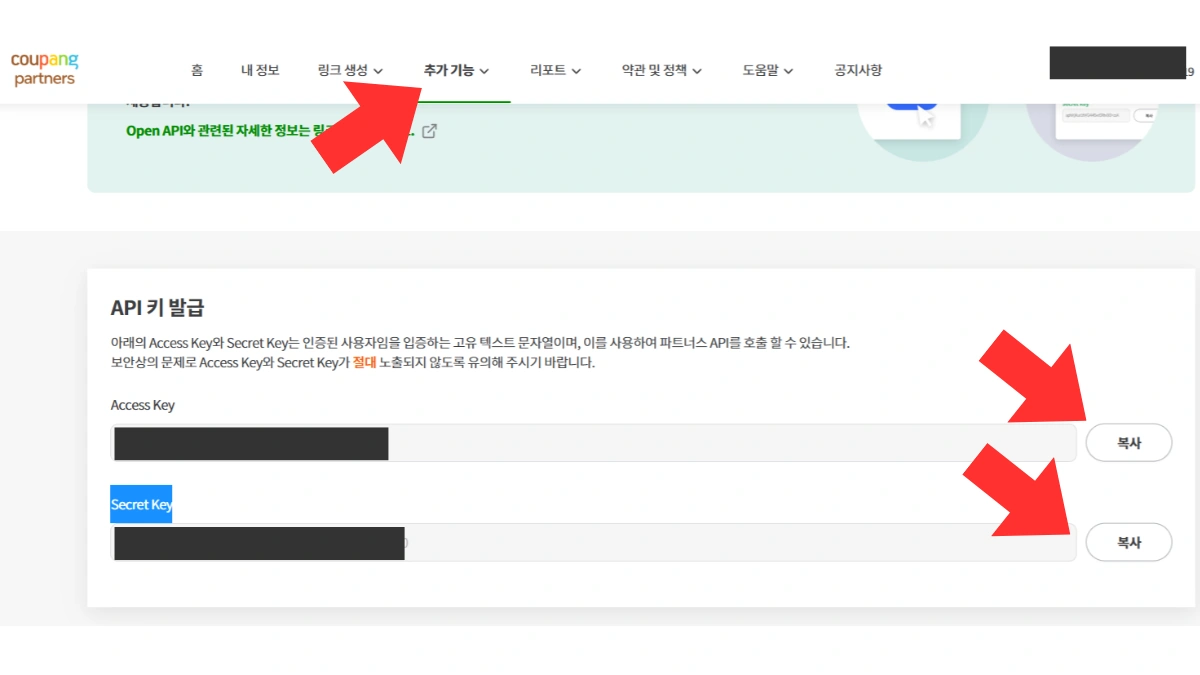
먼저 쿠팡 파트너스 사이트에 접속해 Access Key와 Secret Key를 복사해 메모해 두세요.
1. 쿠팡 파트너스 사이트 접속 후 API 키 복사
2. Google Apps Script, 파트너스 자동화
Google Apps Script는 구글이 제공하는 클라우드 기반 자바스크립트 플랫폼입니다. 구글 스프레드시트, 지메일 등과 쉽게 연동되며 외부 API와의 통신도 간단합니다.
왜 Apps Script인가요?
- 무료 및 서버리스: 별도 서버 없이 구글 인프라 사용 가능
- 쉬운 연동: 구글 서비스 및 외부 API와 간단한 연결
- 자동화: 24시간 자동으로 최신 상품 정보 가져오기
이 Apps Script로 쿠팡 파트너스 API와 통신하여 상품명, 가격, 이미지, 링크 등을 JSON 형태로 받아올 수 있습니다.
3. Google Apps Script 설정 및 사용 방법
1. Google Apps Script 접속합니다.
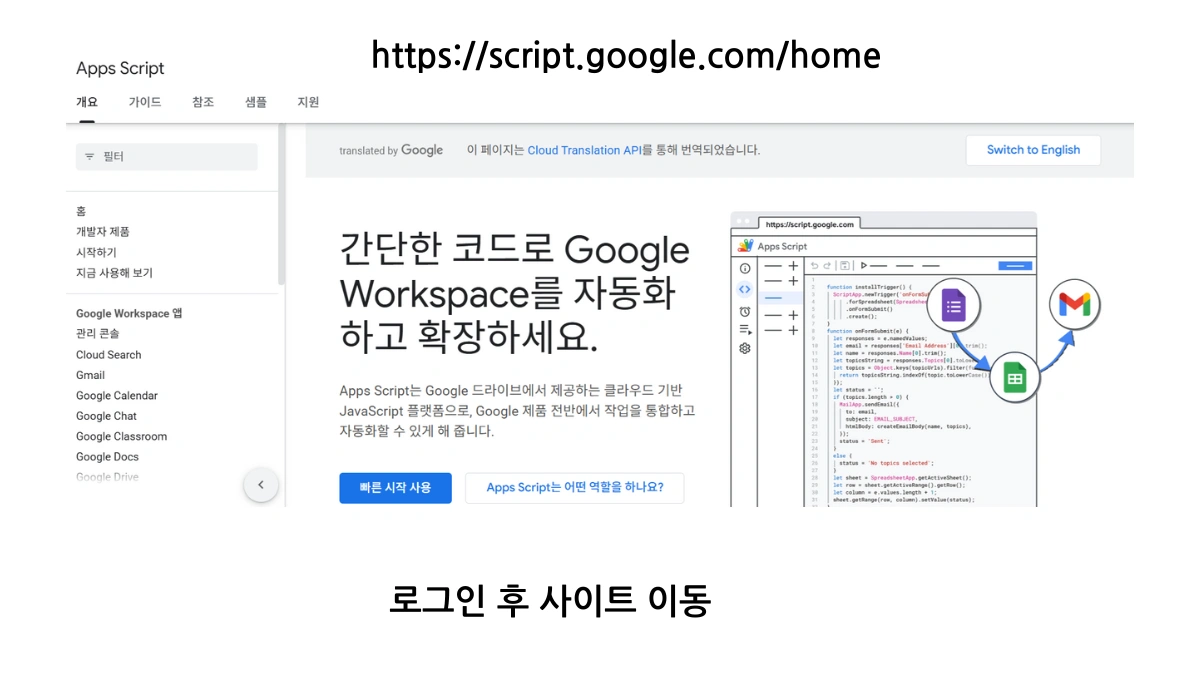
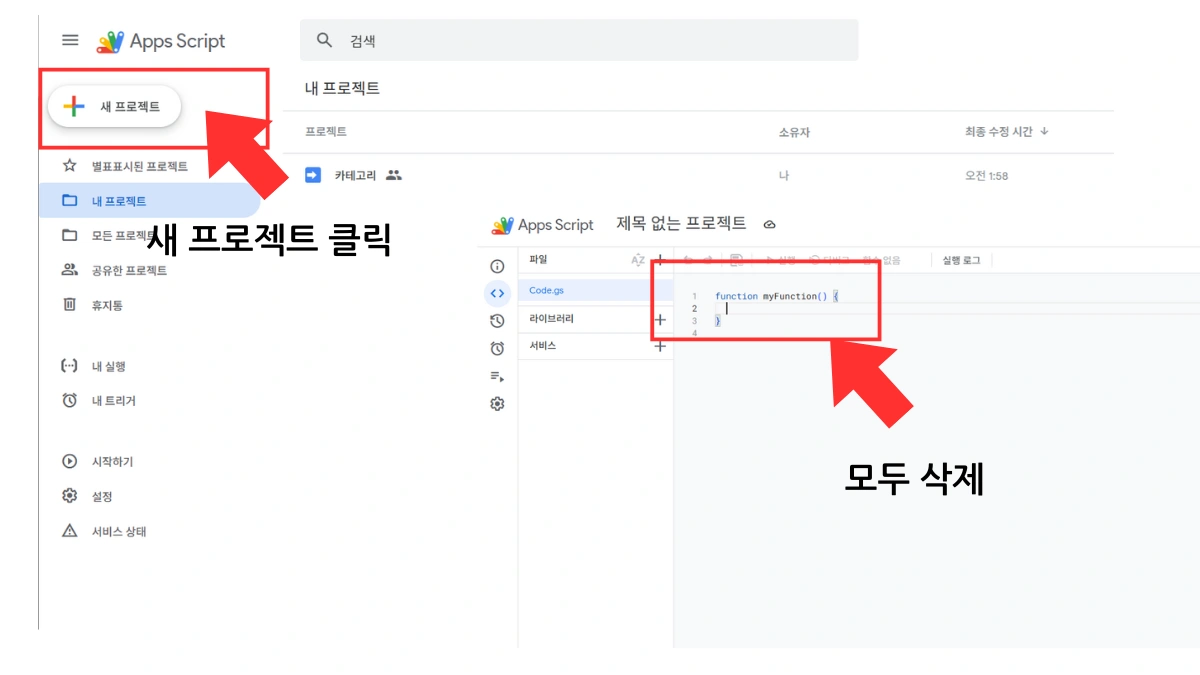
2. 먼저 쿠팡 API와 연동할 Apps Script 새 프로젝트를 생성합니다.
프로젝트를 생성한 후 기본적으로 설정된 코드 삭제합니다.
3. Code.gs 파일에 코드 붙여넣기
- 전체 Apps Script 코드를 복사해 붙여넣기
- COUPANG_ACCESS_KEY, COUPANG_SECRET_KEY, COUPANG_AFFILIATE_ID를 자신의 정보로 수정
- 쿠팡 상품중 노출하고자 하는 카테고리 변경.
- 나머지 그대로….
쿠팡 카테고리 상품 번호
| Id | 이름 |
|---|---|
| 1001 | 여성패션 |
| 1002 | 남성패션 |
| 1010 | 뷰티 |
| 1011 | 출산/유아동 |
| 1012 | 식품 |
| 1013 | 주방용품 |
| 1014 | 생활용품 |
| 1015 | 홈인테리어 |
| 1016 | 가전디지털 |
| 1017 | 스포츠/레저 |
| 1018 | 자동차용품 |
| 1019 | 도서/음반/DVD |
| 1020 | 완구/취미 |
| 1021 | 문구/오피스 |
| 1024 | 헬스/건강식품 |
| 1025 | 국내여행 |
| 1026 | 해외여행 |
| 1029 | 반려동물용품 |
| 1030 | 유아동패션 |
쿠팡 카테고리 상품
const PRODUCT_LIST_API_PATH ="/v2/providers/affiliate_open_api/apis/openapi/products/bestcategories/1001?limit=50"
쿠팡 PL 상품
const PRODUCT_LIST_API_PATH = "/v2/providers/affiliate_open_api/apis/openapi/products/coupangPL";
// ==== 설정값 (본인의 정보로 변경) ====

const COUPANG_ACCESS_KEY = "당신의 ACCESS KEY"; // 쿠팡 API Access Key

const COUPANG_SECRET_KEY = "당신의 SECRET KEY"; // 쿠팡 API Secret Key

const COUPANG_AFFILIATE_ID = "당신의 AFFILIATE ID"; // 쿠팡 파트너스 ID (lptag=AF1234567의 AF1234567 부분)
// 쿠팡 API 기본 URL 및 Deep Link 경로
const COUPANG_API_BASE_URL = "https://api-gateway.coupang.com";
const DEEPLINK_API_PATH = "/v2/providers/affiliate_open_api/apis/openapi/v1/deeplink";
// 상품 목록 조회 API 경로(상품 카테고리로 변경)
const PRODUCT_LIST_API_PATH = "/v2/providers/affiliate_open_api/apis/openapi/products/coupangPL";
// ---
// ==== GMT 날짜 형식 생성 함수 (yyMMdd'T'HHmmss'Z' 포맷) ====
function getCoupangApiDate() {
const date = new Date();
const year = date.getUTCFullYear().toString().substring(2); // YY (예: 2025 - 25)
const month = (date.getUTCMonth() + 1).toString().padStart(2, '0'); // MM
const day = date.getUTCDate().toString().padStart(2, '0'); // DD
const hours = date.getUTCHours().toString().padStart(2, '0'); // HH
const minutes = date.getUTCMinutes().toString().padStart(2, '0'); // mm
const seconds = date.getUTCSeconds().toString().padStart(2, '0'); // ss
return `$year}$month}$day}T$hours}$minutes}$seconds}Z`;
}
// ==== HMAC Signature 생성 함수 ====
function generateCoupangSignature(method, uri, secretKey, accessKey) {
const parts = uri.split('?');
const path = parts[0];
const query = (parts.length === 2) ? parts[1] : '';
const datetime = getCoupangApiDate();
const stringToSign = `$datetime}$method}$path}$query}`;
const signatureBytes = Utilities.computeHmacSha256Signature(stringToSign, secretKey);
const signatureHex = bytesToHex(signatureBytes);
return `CEA algorithm=HmacSHA256, access-key=$accessKey}, signed-date=$datetime}, signature=$signatureHex}`;
}
// ==== 바이트 배열을 16진수 문자열로 변환하는 헬퍼 함수 ====
function bytesToHex(bytes) {
return Array.from(bytes, function(byte) {
return ('0' + (byte & 0xFF).toString(16)).slice(-2);
}).join('');
}
// ---
// ==== Deep Link 생성 API 호출 함수 (사용자 요청 시 POST로 호출 가능) ====
function generateCoupangDeepLink(coupangUrls) {
const method = 'POST';
const uri = DEEPLINK_API_PATH;
const url = COUPANG_API_BASE_URL + uri;
const requestPayload = {
coupangUrls: coupangUrls
};
const requestBody = JSON.stringify(requestPayload);
const authorizationHeader = generateCoupangSignature(method, uri, COUPANG_SECRET_KEY, COUPANG_ACCESS_KEY);
const options = {
method: method,
headers: {
'Authorization': authorizationHeader,
'Content-Type': 'application/json;charset=UTF-8'
},
payload: requestBody,
muteHttpExceptions: true
};
try {
const response = UrlFetchApp.fetch(url, options);
const responseCode = response.getResponseCode();
const responseBody = response.getContentText();
if (responseCode === 200) {
const parsedResponse = JSON.parse(responseBody);
Logger.log("Deep Link API Response: " + JSON.stringify(parsedResponse, null, 2));
return parsedResponse;
} else {
Logger.log(`API Error: $responseCode} - $responseBody}`);
return null;
}
} catch (e) {
Logger.log(`Fetch Error: $e.message}`);
return null;
}
}
// ---
// ==== 상품 목록 조회 API 호출 함수 ====
function fetchCoupangProducts(limit = 20) { // 기본값 20개
const method = 'GET';
const uri = `$PRODUCT_LIST_API_PATH}?limit=$limit}`;
const url = COUPANG_API_BASE_URL + uri;
const authorizationHeader = generateCoupangSignature(method, uri, COUPANG_SECRET_KEY, COUPANG_ACCESS_KEY);
const options = {
method: method,
headers: {
'Authorization': authorizationHeader,
},
muteHttpExceptions: true
};
try {
const response = UrlFetchApp.fetch(url, options);
const responseCode = response.getResponseCode();
const responseBody = response.getContentText();
if (responseCode === 200) {
const parsedResponse = JSON.parse(responseBody);
Logger.log(`Product List API Response (limit=$limit}): ` + JSON.stringify(parsedResponse, null, 2));
return parsedResponse;
} else {
Logger.log(`API Error: $responseCode} - $responseBody}`);
return null;
}
} catch (e) {
Logger.log(`Fetch Error: $e.message}`);
return null;
}
}
// ---
// ==== 웹 앱으로 배포할 함수 (GET 요청 처리: 상품 목록 조회) ====
function doGet(e) {
let limit = parseInt(e.parameter.limit); // 블로그에서 보낸 limit 파라미터를 받음
if (isNaN(limit) || limit 1 || limit 100) {
limit = 20; // limit 값이 없거나 유효하지 않으면 기본 20개
}
const productsResult = fetchCoupangProducts(limit);
// 쿠팡 API 응답에서 'rCode'가 '0'이고 'data' 필드가 존재할 때만 'data' 필드의 내용을 반환
if (productsResult && productsResult.rCode === "0" && productsResult.data) {
return ContentService.createTextOutput(JSON.stringify(productsResult.data, null, 2))
.setMimeType(ContentService.MimeType.JSON);
} else {
// 오류가 있거나 데이터가 없는 경우, 오류 메시지를 포함하여 반환
const errorMessage = productsResult && productsResult.rMessage ? productsResult.rMessage : "상품 목록 조회 실패 또는 데이터 없음.";
Logger.log(`상품 조회 실패: $errorMessage}`);
return ContentService.createTextOutput(JSON.stringify({ error: errorMessage }))
.setMimeType(ContentService.MimeType.JSON);
}
}
// ==== 웹 앱으로 배포할 함수 (POST 요청 처리: Deep Link 생성 - 현재 블로그에서는 GET만 사용) ====
function doPost(e) {
try {
const requestData = JSON.parse(e.postData.contents);
const coupangUrls = requestData.coupangUrls;
if (!coupangUrls || !Array.isArray(coupangUrls) || coupangUrls.length === 0) {
return ContentService.createTextOutput(JSON.stringify({ error: "'coupangUrls' 배열을 JSON 바디에 포함해주세요." }))
.setMimeType(ContentService.MimeType.JSON);
}
const deepLinkResult = generateCoupangDeepLink(coupangUrls);
if (deepLinkResult) {
return ContentService.createTextOutput(JSON.stringify(deepLinkResult, null, 2))
.setMimeType(ContentService.MimeType.JSON);
} else {
return ContentService.createTextOutput(JSON.stringify({ error: "Deep Link 생성 실패" }))
.setMimeType(ContentService.MimeType.JSON);
}
} catch (err) {
Logger.log("doPost 오류: " + err.message);
return ContentService.createTextOutput(JSON.stringify({ error: "요청 처리 중 오류 발생: " + err.message }))
.setMimeType(ContentService.MimeType.JSON);
}
}
4. Apps Script 웹 앱 배포
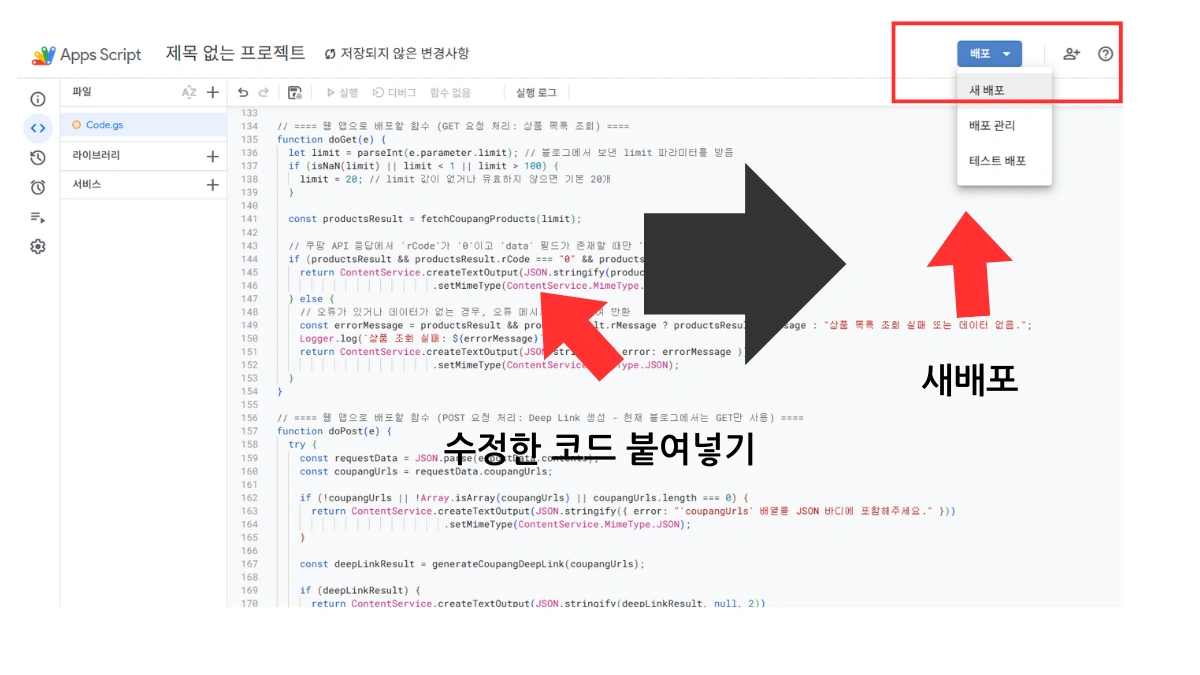
- 코드를 저장한 후, 상단 메뉴에서 배포 새 배포를 클릭합니다.
5. 유형 선택에서 웹 앱을 선택합니다.
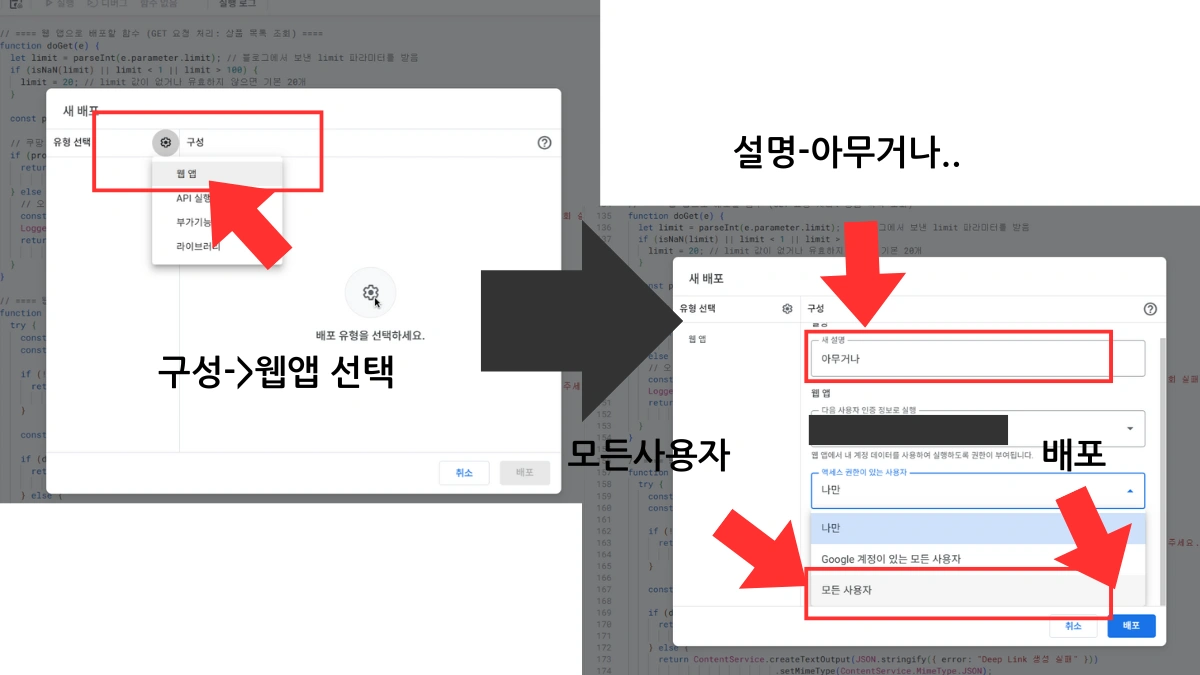
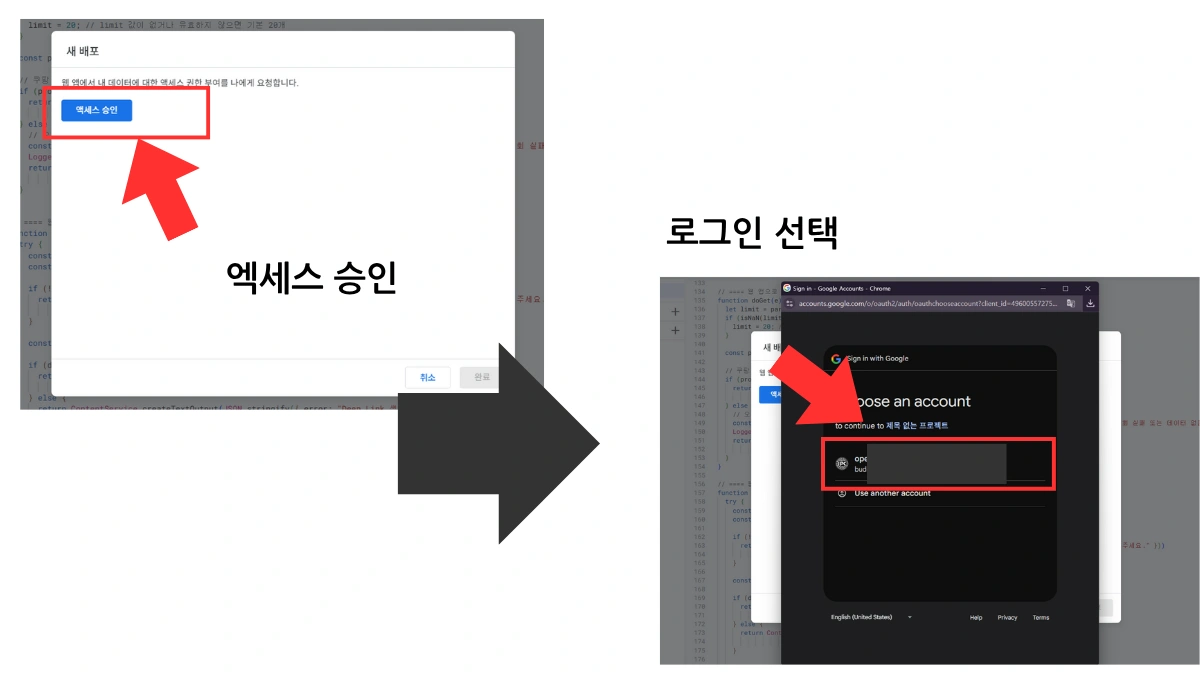
7.이미지 순서대로 버튼을 클릭합니다.
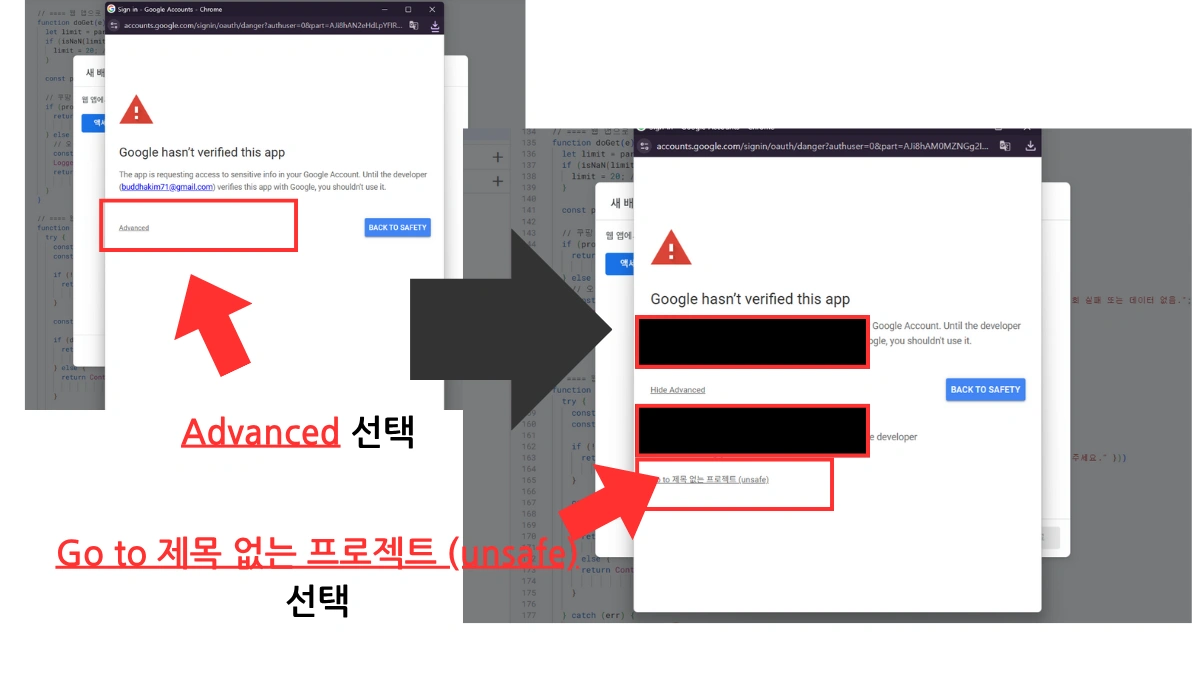
8. ALLOW 버튼을 클릭하고 주소 복사후 완료
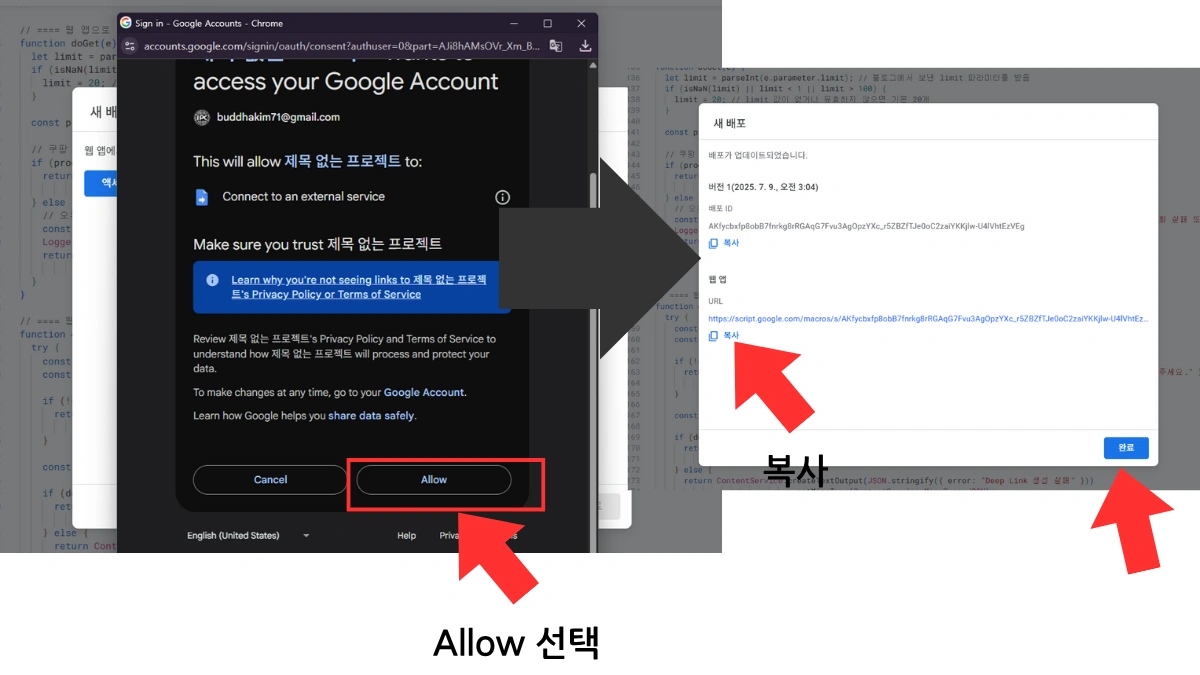
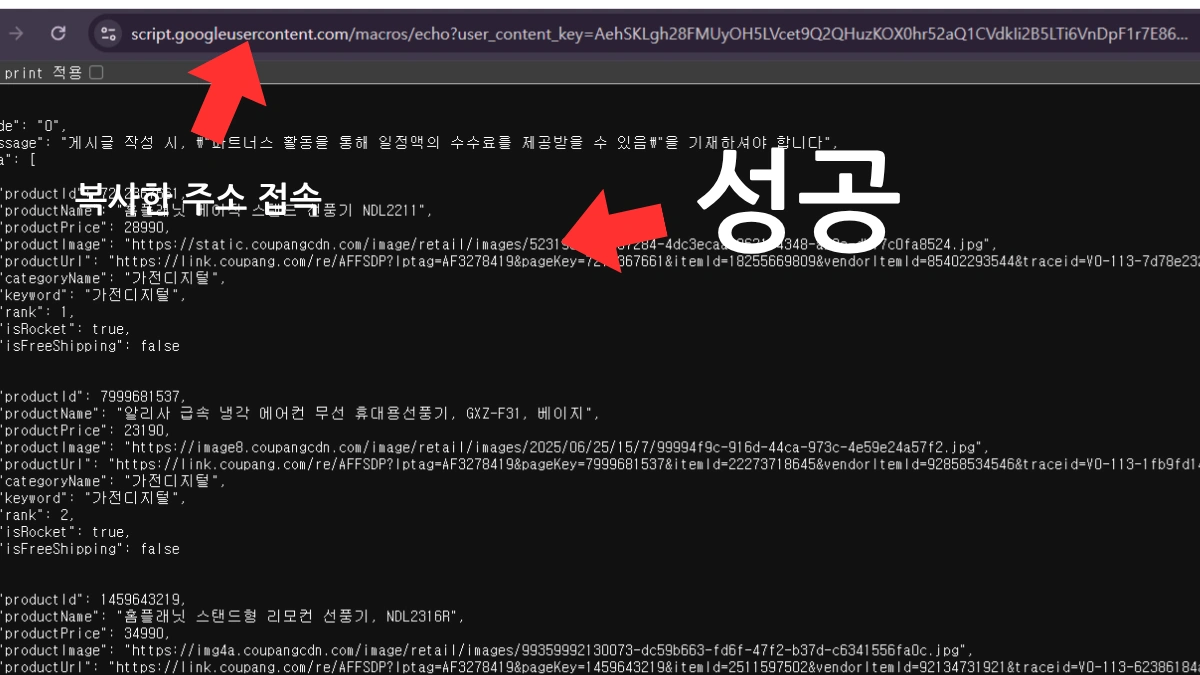
9. 복사한 주소 접속 데이터 확인후 주소 메모
긴 웹 앱 주소(https://script.googleusercontent.com/macros/echo?…)가 생성됩니다. 이 주소를 정확히 복사해 두세요. 이 URL은 블로그에서 웹 앱에 접근하는 유일한 경로입니다.
티스토리 블로그에 쿠팡 상품 노출 코드 적용
이제 상품을 노출하기 위해 블로그에 설정을 진행합니다.
1. 티스토리 관리자 페이지 HTML 모드
아래 코드를 쿠팡 상품을 자동으로 노출하고자 하는 위치에 삽입합니다.
새 글에 적용하거나 기존 글에 추가할 수 있으며, 기본 스킨에 고정하여 사용할 수도 있습니다.
에디터에서 HTML 모드로 전환한 뒤 코드를 붙여넣어 주세요.
p이 포스팅은 쿠팡 파트너스 활동의 일환으로 일정액의 수수료를 제공받습니다./p

div id="coupang-products-container"

 p잠시만 기다려주세요. 상품 정보를 불러오는 중입니다.../p

/div
2. HTML/JavaScript 코드 삽입
- 제공된 코드를 복사해 HTML 모드에 붙여넣습니다.
- 중요: 코드 내 const apiUrl = ‘URL 입력&limit=3’; 입력부분에 복사한 웹 앱 URL을 정확히 삽입하세요.
const apiUrl = ‘복사 URL입력_&limit=3’; // 노출 상품수 설정 (현재 3개)
script

async function loadCoupangProducts() {

 const container = document.getElementById('coupang-products-container');

 const apiUrl = 'URL 입력&limit=3'; // 실제 URL 입력
try {
const response = await fetch(apiUrl);
if (!response.ok) throw new Error(`API 요청 실패: $response.status}`);
const data = await response.json();
const products = Array.isArray(data) ? data.slice(0, 3) :
data?.data?.slice(0, 3) || [];
if (products.length 0) {
let html = `
p class="product-title"쿠팡 추천 상품/p
div class="product-grid"
$products.map(product = `
div class="product-item"
a href="$product.productUrl || '#'}" target="_blank" rel="noopener"
img class="product-image" src="$product.productImage || 'https://via.placeholder.com/150'}" alt="$product.productName || ''}"
p class="product-name"$product.productName || '상품명 없음'}/h3
p class="product-price"$product.productPrice?.toLocaleString() + '원' || '가격 정보 없음'}/p
button class="detail-button"자세히 보기/button
/a
/div
`).join('')}
/div
`;
container.innerHTML = html;
} else {
container.innerHTML = 'p class="no-products"표시할 상품이 없습니다./p';
}
} catch (error) {
container.innerHTML = 'p class="error-message"상품 로딩 중 오류 발생/p';
console.error(error);
}
}
window.addEventListener('DOMContentLoaded', loadCoupangProducts);
/script
3. 쿠팡 파트너스 자동 노출 상품에 CSS 적용
상품 CSS는 블로그 스타일에 맞게 자유롭게 커스터마이즈할 수 있습니다.
아래는 다크 모드와 모바일에 최적화된 기본 예시입니다.
/* 상품 컨테이너 */

#coupang-products-container{

max-width:1000px;

}

.product-grid {

 display: grid;

 /* 기본적으로 모바일에서 1열로 표시 */

 grid-template-columns: repeat(1, 1fr);

 gap: 20px;

 margin-top: 20px;

}
/* 개별 상품 스타일 */
.product-item {
border: 1px solid #eee;
padding: 15px;
border-radius: 8px;
text-align: center;
transition: transform 0.2s;
}
.product-item:hover {
transform: translateY(-5px);
box-shadow: 0 5px 15px rgba(0,0,0,0.1);
}
.product-image {
max-width: 100%;
object-fit: contain;
border-radius: 4px;
margin-bottom: 10px;
}
.product-name {
font-size: 1.1rem;
margin: 0 0 10px;
height: 3em;
overflow: hidden;
display: -webkit-box;
-webkit-line-clamp: 2;
-webkit-box-orient: vertical;
}
.product-price {
font-size: 1.2rem;
font-weight: bold;
color: #FF0000;
margin: 0;
}
.detail-button {
background-color: var(--dark); /* 이 변수가 정의되어 있지 않다면 다른 색상 코드로 변경하세요 (예: #1a73e8) */
color: white;
padding: 8px 15px;
border: none;
border-radius: 5px;
cursor: pointer;
margin-top: 15px;
width: 100%;
}
/* 기타 스타일 */
.product-title {
font-size: 1.6rem;
color: #333;
margin-bottom: 15px;
}
.no-products,
.error-message {
color: #666;
text-align: center;
padding: 20px;
}
---
/* === 반응형 미디어 쿼리 추가 === */
/* 태블릿 (화면 너비가 600px 이상일 때) */
@media (min-width: 600px) {
.product-grid {
grid-template-columns: repeat(2, 1fr); /* 2열로 변경 */
}
}
/* 데스크톱 (화면 너비가 992px 이상일 때) */
@media (min-width: 992px) {
.product-grid {
grid-template-columns: repeat(3, 1fr); /* 3열로 변경 */
}
}
검색 최적화(SEO) 및 추가 팁
- HTML 구조: 상품 목록을 감싸는
div와h2태그는 검색 엔진이 콘텐츠의 중요도를 파악하는 데 도움을 줍니다.h2쿠팡 추천 상품/h2처럼 키워드를 포함하세요. - 이미지 alt 속성:
alt="$productName}"은 이미지 접근성과 SEO 향상에 효과적입니다. - 반응형 디자인:
display: grid를 사용하면 모바일에서도 상품이 깔끔하게 보입니다. - 상품 개수 조절:
const queryLimit = 5;값을 변경해 노출 상품 개수를 자유롭게 조절할 수 있습니다. 예:queryLimit = 10;
이 과정을 통해 블로그는 쿠팡 파트너스 수익을 위한 강력한 자동화 도구를 갖추게 됩니다. 방문자들은 항상 최신 상품 정보를 확인할 수 있어 클릭률과 전환율 향상에 기여하게 됩니다. 성공적인 블로그 운영을 응원합니다!