
We provide a guide on how to use tags for Blog Search Engine Optimization (SEO) and tips for their application. We focus on presenting search exposure strategies by analyzing the positive and negative aspects of tags, solving duplicate content issues, and effectively distinguishing them from categories.
1. The Role of Blog Tags and Their Importance from an SEO Perspective
In a blog, tags are important metadata elements that help categorize content and assist users and search engines in finding information. Tags should be provided in the form of links that summarize the topic of the content. While the use of tags does not directly impact search optimization, it indirectly provides significant help for search engines to understand the content’s topic and form an internal link structure.
However, if there is duplicate content on a tag page or if the same tag is applied to multiple pieces of content, competition between contents can occur in search results. It is advantageous for SEO to use tags consistently and clearly distinguish them from categories (main classifications).
How to Use Tags for SEO Optimization and Precautions
There is a tendency to use many tags when creating blog content. In the past, there was a time when posts were flooded with tags at the beginning, but now, due to the evolution of search engines (especially Google’s strengthened anti-spam algorithms), the past methods can actually have a negative effect. Therefore, we will organize data on how to best use tags and conduct an in-depth analysis of the impact tags have on search exposure.
2. Tag Usage and Format: Link-Based Classification System
The role of a tag is a crucial element that classifies content on a web page or blog and helps users and search engines find content easily. Tags contain links, and through these links, it is possible to move to a Tag Archive Page. This tag page acts as an index page that gathers and shows all content to which the corresponding tag has been applied.
Tag Format and Recognition Method
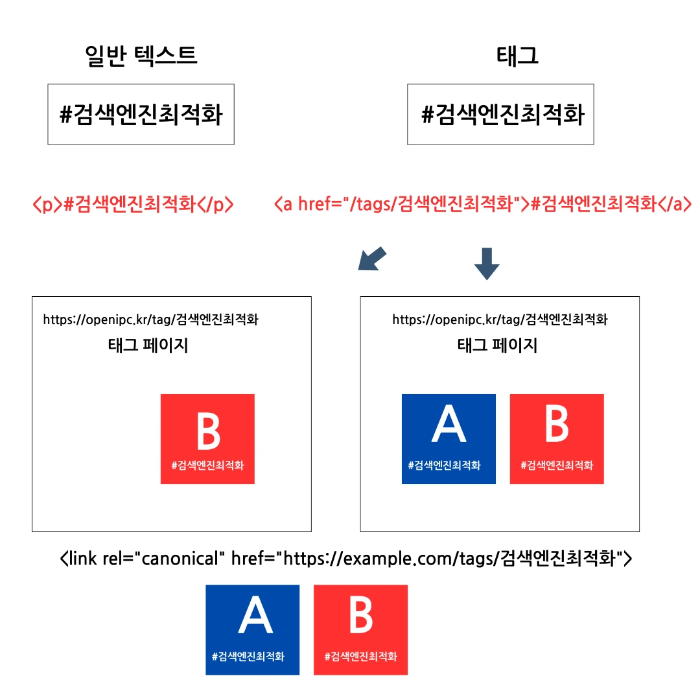
As shown below, the text “#SearchEngineOptimization” without a link is recognized as general text, not a tag. Conversely, a phrase with a tag format that includes a link (e.g., a href="/tag/SearchOptimization"#SearchOptimization/a) is recognized as a tag, and not only search engines but also users can move to the relevant tag page.
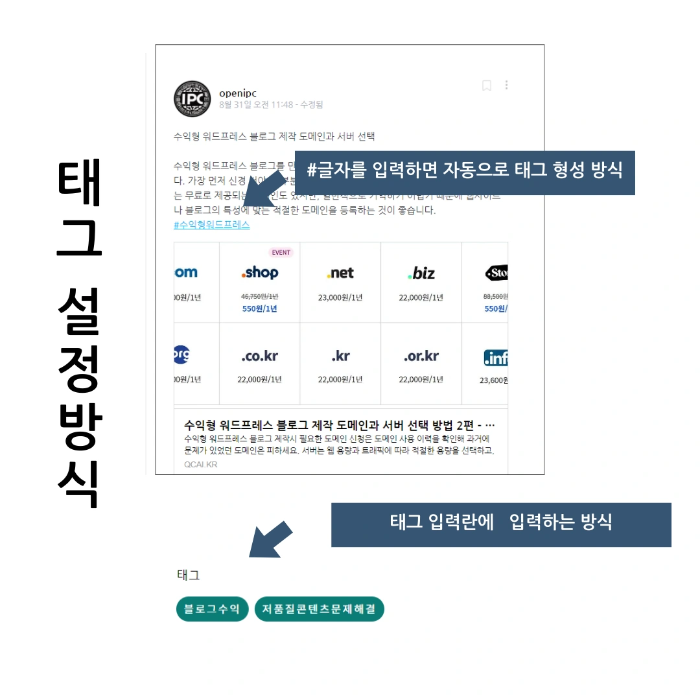
There are differences in how tags are entered. The main methods are forming a tag by entering ‘#’ and characters, or operating a separate tag input field. The way to know if it’s a tag or not is simple: whether it is clickable and allows moving to another page.
Search engines judge the presence of a tag in the same way. A tag that is not a link is recognized simply as text and is regarded only as part of the content’s substance, not as a classification system.
✔ Note!
Tags are primarily tools for increasing search efficiency and user convenience. By using tags, users can easily find related content, making navigation within the site smoother. However, tags themselves are not currently a factor that directly has a major impact on Search Engine Optimization (SEO) or search exposure. The main role of tags lies in strengthening the internal link structure and providing users with content based on ‘similar keywords.’
3. In-depth Analysis of Positive and Negative Aspects of Tag Usage
Positive Aspects of Tags (Strengthening User Experience and Internal Links)
Strategic use of tags can bring the following positive effects to a blog:
- Improved Topic Understanding: Appropriate tag usage helps search engines understand the detailed topics of a page, which can increase the chances of exposure for highly relevant long-tail search terms.
- Role in Site Navigation: Tags serve as site navigation by providing users with related content. User experience (UX) is improved as they can easily find content related to topics of interest.
- Efficiency in Content Management and Classification: Using tags allows for efficient classification and management of content. Especially when there is a large volume of content, it is effective for quickly grouping all posts related to a specific topic.
- Increased Site Dwell Time: Recommending related content using tags can increase a user’s dwell time on the site. This acts as an indirect positive signal for Google to evaluate content quality.
Negative Aspects of Tags (Duplicate Content and Cannibalization)
However, if used incorrectly, tags can cause fatal SEO problems. Mainly, ‘Duplicate Content’ and ‘Keyword Cannibalization’ become issues.
1. When Only One Piece of Content Exists for a Specific Tag Page
A problem arises if only one piece of content is assigned to a tag page. In this case, the content of the tag page becomes almost identical to the summary (or the whole) of the original content page. Search engines may recognize this as duplicate content. The original post and the tag page compete with each other, which can negatively affect SEO. To solve this problem, you should apply a noindex tag to tag pages or set a policy to use tags only when there are at least two or more pieces of content.
2. When Multiple Pieces of Content with the Same Tag Exist
If multiple pieces of content have the same tag, search engines may have difficulty determining the priority among these contents. This can lead to competition (cannibalization) between contents in search results. In other words, a priority conflict occurs among the set of contents assigned the same tag, and your own contents end up competing with each other. To avoid this problem, do not use tags too broadly; they must be applied focusing on detailed and specific ‘long-tail keywords.’
4. Effective Tag Usage and Management Strategy
Essential Considerations When Using Tags
- Maintain Consistency: It is important to maintain consistency while using tags. Instead of using various tags like ‘SEO Optimization,’ ‘Search Engine Optimization,’ and ‘How to Optimize Search’ for the same topic, it is better to use a consistent tag (e.g., ‘Search Engine Optimization’). This increases the cohesion of the tag page.
- Avoid Excessive Use: Using too many tags in one post actually becomes a negative factor. The meaning of the tags is diluted, and it can cause confusion for search engines in identifying the core topic of the content. It is recommended to use about 3 to 5 core and long-tail keywords.
- Clear Distinction from Categories: Tags and categories should be appropriately distinguished. Categories generally represent the largest classifications of content (e.g., ‘Marketing,’ ‘IT Technology’), while tags specifically represent detailed topics or related content (e.g., ‘Google SEO,’ ‘Core Web Vitals,’ ‘Content Strategy’).
Technical Considerations
- Handling Spaces: If a tag includes spaces, it may not be properly recognized on the web or may generate incorrect links. While most blog platforms automatically convert spaces to hyphens (-) or underscores (_), it is safer to type them without spaces (e.g., SearchOptimization) when entering manually.
- Avoiding HTML Anchor Link Conflicts: In HTML,
#is primarily used to specify the ID of an anchor link. Therefore, writing a ‘Search Engine Optimization’ tag by attaching#to general text is merely a stylistic element; it must take the form of a link to be recognized as an actual tag.
Tags are an important tool for organizing website or blog content and providing useful information to both users and search engines. To maximize positive effects (user navigation, internal links) and minimize negative effects (duplicate content, cannibalization), it is important in search exposure to use tags carefully and manage them periodically.
Is using more tags more beneficial for SEO?
No. Excessive use of tags makes the topic of the content ambiguous and can be rather negative for SEO by causing duplicate content issues between tag pages. It is most effective to use only 3 to 5 long-tail keyword tags related to the core topic.
How should I distinguish between categories and tags?
Categories should be used to represent the major classifications (topics) of content, like a book’s ‘Table of Contents,’ and tags should be used to represent detailed content or terms (long-tail keywords) covered in the post, like a book’s ‘Index.’ For example, if the category is ‘Digital Marketing,’ the tags could be ‘Google Search Ads,’ ‘Keyword Analysis Tools,’ ‘Content Marketing Strategy,’ etc.
Is there a way to prevent tag pages from being recognized as duplicate content?
The most reliable way is to apply a meta name="robots" content="noindex" tag to prevent search engines from indexing the tag pages. Alternatively, you should add a unique and useful description to the top of the tag page to ensure differentiation between pages and set it to display only summaries of the list of posts to which the tag is applied.
Is it more important to put key keywords in the body text instead of tags?
Yes, that’s correct. Search engines value the quality of the body content, natural use of key keywords, and heading tags (H1, H2) much more than tags. You should think of tags as supplementary classification and navigation tools and focus on the quality of the content itself and keyword distribution, which are the basic principles of SEO.