워드프레스 망보드(MangBoard)를 사용하시는 분들이라면 한 번쯤 겪어보셨을 법한 구글 서치 콘솔의 ‘링크를 크롤링할 수 없음’ 오류 해결법을 공유하려고 합니다.
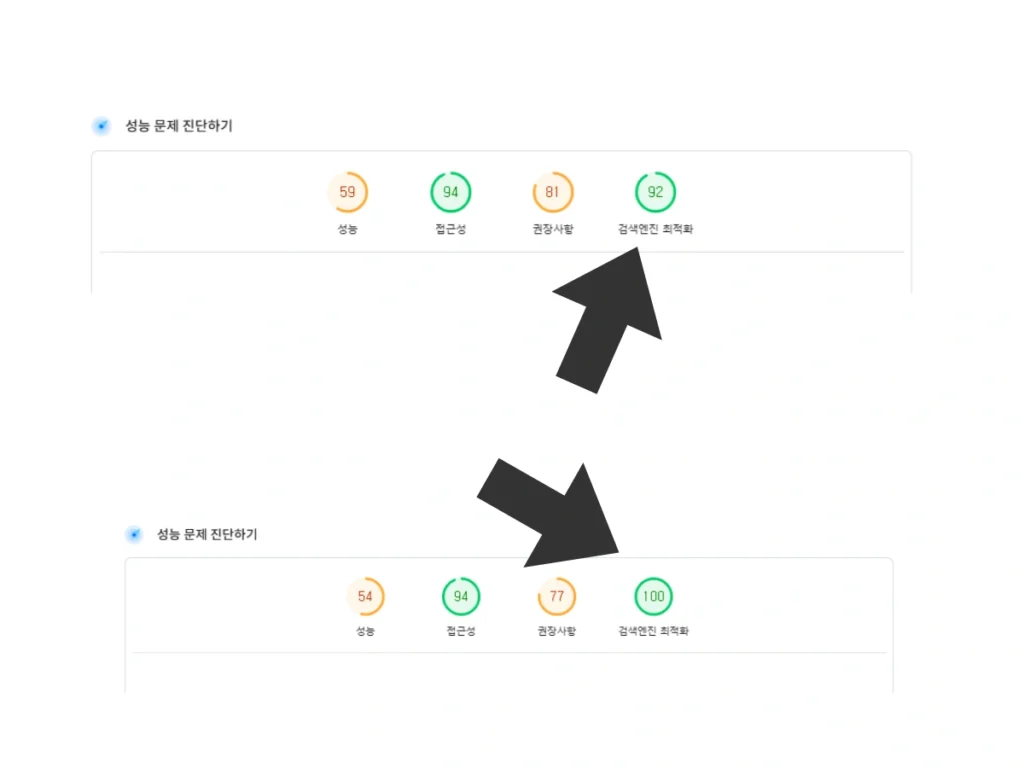
열심히 블로그 글을 쓰고 서치 콘솔을 확인했는데, 갑자기 망보드 SNS 공유 버튼들에서 검색최적화 지적사항에 참 당황스럽죠? 저도 이번에 이 문제를 해결하면서 알게 된 꿀팁을 아주 쉽게 설명해 드릴게요.
목차
1. 망보드 SNS 공유 버튼에 왜 이런 문제가 생길까요?
구글 서치 콘솔에서 지적하는 내용은 보통 이렇습니다.
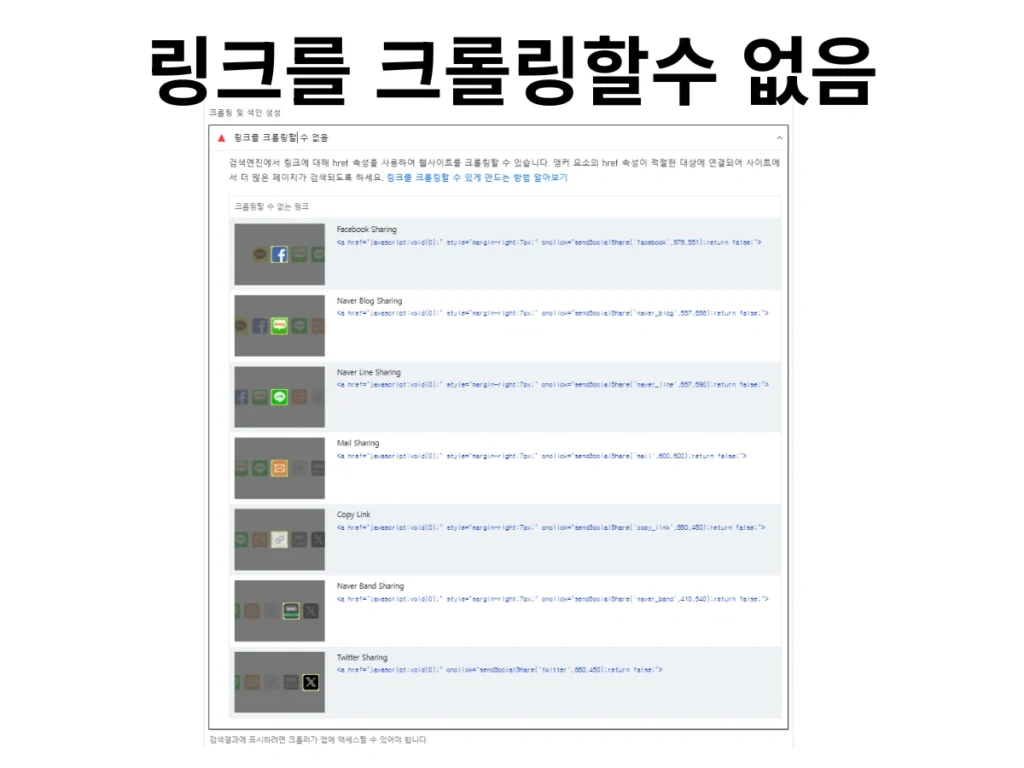
“링크에 href 속성이 없거나 적절하지 않아 로봇이 크롤링할 수 없습니다.”
망보드나 여러 플러그인의 SNS 공유 버튼은 클릭했을 때 페이지가 이동하는 게 아니라, 팝업창이 뜨도록 설계되어 있어요. 그러다 보니 주소를 넣는 공간인 a 태그의 href 속성이 비어 있거나 javascript:void(0); 같은 가짜 주소가 들어가게 됩니다.
예전에는 괜찮았지만, 요즘 똑똑해진 구글 로봇은 “이건 가짜 주소잖아! 고장 난 링크네?”라고 판단해서 에러 보고서를 보내는 것이죠.
2. 해결 방법: 망보드 SNS 공유 버튼 a 태그를 span으로 변환하기
이 문제를 해결하는 가장 깔끔한 방법은 검색 로봇에게 “이건 링크가 아니라 그냥 클릭하면 작동하는 버튼이야“라고 알려주는 것입니다.
방법은 간단합니다. 링크를 뜻하는 a 태그 대신, 일반적인 영역을 뜻하는 span 태그로 바꿔주는 것이죠. 이렇게 하면 구글 로봇은 주소를 검사하지 않고 그냥 지나가지만, 실제 사용자는 똑같이 클릭해서 공유 기능을 사용할 수 있습니다.
3. 직접 코드 수정하기 (PHP 파일 수정)
파일질라(FTP)를 통해 내 사이트의 망보드 관련 파일을 찾아 아래와 같이 수정해 보세요.
망보드 수정할 위치: (플러그인 망보드)
wp-content/plugins/mangboard/plugins/sociallogin/sociallogin.php[수정 전 코드 예시]
<a style="margin-right:7px;" onclick="sendSocialShare('facebook',979,551);return false;"
 img src="...icon_facebook.png"
/a>
[수정 후 코드 예시 – 검색 최적화 적용]
// google sharing
// $social_sharing .= '<span style="'.$social_sharing_style.' cursor:pointer;" onclick="sendSocialShare(\'google\',520,480)"><img src="'.MBW_PLUGIN_URL.'plugins/sociallogin/images/icon_google.png" style="max-width:'.$share_icon_width.'px;max-height:'.esc_attr($share_icon_height).'px;" title="Google Plus Sharing" alt="Google Plus Sharing" class="radius-4"></span>';

// kakao sharing
if (mbw_get_option('kakao_javascript_key') != "" && mbw_get_trace("mbw_head_meta") != "") {
    $social_sharing .= '<span style="'.$social_sharing_style.' cursor:pointer;" onclick="sendSocialShare(\'kakao\',427,789);return false;" class="mb-kakao-link-btn2"><img src="'.MBW_PLUGIN_URL.'plugins/sociallogin/images/icon_kakao.png" style="max-width:'.$share_icon_width.'px;max-height:'.esc_attr($share_icon_height).'px;" title="Kakao Sharing" alt="Kakao Sharing" class="radius-4"></span>';
}

// facebook sharing
$social_sharing .= '<span style="'.$social_sharing_style.' cursor:pointer;" onclick="sendSocialShare(\'facebook\',979,551);return false;"><img src="'.MBW_PLUGIN_URL.'plugins/sociallogin/images/icon_facebook.png" style="max-width:'.$share_icon_width.'px;max-height:'.esc_attr($share_icon_height).'px;" title="Facebook Sharing" alt="Facebook Sharing" class="radius-4"></span>';

// naver_blog sharing
$social_sharing .= '<span style="'.$social_sharing_style.' cursor:pointer;" onclick="sendSocialShare(\'naver_blog\',557,856);return false;"><img src="'.MBW_PLUGIN_URL.'plugins/sociallogin/images/icon_naver_blog.png" style="max-width:'.$share_icon_width.'px;max-height:'.esc_attr($share_icon_height).'px;" title="Naver Blog Sharing" alt="Naver Blog Sharing" class="radius-4"></span>';

// kakao story sharing
// $social_sharing .= '<span style="'.$social_sharing_style.' cursor:pointer;" onclick="sendSocialShare(\'kakao_story\',653,471);return false;"><img src="'.MBW_PLUGIN_URL.'plugins/sociallogin/images/icon_kakao_story.png" style="max-width:'.$share_icon_width.'px;max-height:'.esc_attr($share_icon_height).'px;" title="Kakao Story Sharing" alt="Kakao Story Sharing" class="radius-4"></span>';

// naver_line sharing
if (mbw_get_vars("device_type") != "desktop") {
    $social_sharing .= '<span style="'.$social_sharing_style.' cursor:pointer;" onclick="sendSocialShare(\'naver_line\',557,590);return false;"><img src="'.MBW_PLUGIN_URL.'plugins/sociallogin/images/icon_naver_line.png" style="max-width:'.$share_icon_width.'px;max-height:'.esc_attr($share_icon_height).'px;" title="Naver Line Sharing" alt="Naver Line Sharing" class="radius-4"></span>';
}

// mail sharing
$social_sharing .= '<span style="'.$social_sharing_style.' cursor:pointer;" onclick="sendSocialShare(\'mail\',600,600);return false;"><img src="'.MBW_PLUGIN_URL.'plugins/sociallogin/images/icon_mail.png" style="max-width:'.$share_icon_width.'px;max-height:'.esc_attr($share_icon_height).'px;" title="Mail Sharing" alt="Mail Sharing" class="radius-4"></span>';

// URL 복사
$social_sharing .= '<span style="'.$social_sharing_style.' cursor:pointer;" onclick="sendSocialShare(\'copy_link\',680,450);return false;"><img src="'.MBW_PLUGIN_URL.'plugins/sociallogin/images/icon_copy_link.png" style="max-width:'.$share_icon_width.'px;max-height:'.esc_attr($share_icon_height).'px;border: 1px solid #bbb;" title="Copy Link" alt="Copy Link" class="radius-4"></span>';

// naver_band sharing
$social_sharing .= '<span style="'.$social_sharing_style.' cursor:pointer;" onclick="sendSocialShare(\'naver_band\',410,540);return false;"><img src="'.MBW_PLUGIN_URL.'plugins/sociallogin/images/icon_naver_band.png" style="max-width:'.$share_icon_width.'px;max-height:'.esc_attr($share_icon_height).'px;" title="Naver Band Sharing" alt="Naver Band Sharing" class="radius-4"></span>';

// twitter sharing
$social_sharing .= '<span style="cursor:pointer;" onclick="sendSocialShare(\'twitter\',680,450);return false;"><img src="'.MBW_PLUGIN_URL.'plugins/sociallogin/images/icon_twitter.png" style="max-width:'.$share_icon_width.'px;max-height:'.esc_attr($share_icon_height).'px;" title="Twitter Sharing" alt="Twitter Sharing" class="radius-4"></span>';
핵심 포인트:
a를span으로 변경합니다.style속성에cursor:pointer;를 추가합니다. (이미지에 마우스를 올렸을 때 클릭 가능한 손가락 모양이 나오게 해줍니다.)- 마지막 닫는 태그를
/span>로 바꿔줍니다.
4. 망보드 SNS 공유 버튼 수정 결과 확인하기
코드를 수정하고 나면 반드시 다음 두 가지를 확인하세요!
- 클릭 테스트: 내 블로그 글 하단에 SNS 아이콘을 눌렀을 때 공유 창이 예전처럼 잘 뜨는지 확인합니다.
- 구글 서치 콘솔 재검토: 에러가 났던 항목으로 들어가 ‘수정 결과 확인’ 버튼을 누릅니다. 구글 로봇이 다시 방문해서 “아, 이제 링크 에러가 없네!”라고 확인하면 며칠 뒤에 경고가 깔끔하게 사라집니다.
마치며
검색 엔진 최적화(SEO)는 이런 작은 디테일에서 결정되는 것 같아요. 링크 하나하나 검색엔진이 좋아하는 방식으로 맞춰주다 보면 내 소중한 블로그 글들이 더 높은 점수를 받을 수 있겠죠?
망보드 SNS 버튼 에러로 고민하셨던 분들에게 이 글이 시원한 해결책이 되었길 바랍니다