The Role of H1 Tags and the Impact of Dual H1 Tags on SEO
One of the important aspects of running a blog is the correct use of H1 tags. The H1 tag represents the core title of a page in HTML and plays a crucial role in helping search engines understand the subject of the page. However, if dual H1 tags exist on a page, it can have a negative impact on SEO. On blog platforms, dual H1 tags can sometimes be hidden within default skins, and failing to correct this can cause confusion in search engine crawling and indexing.
Importance of H1 Tags and Principles of Correct Structuring
The H1 tag indicates the core title of the page and is essential for search engines to understand the topic of the content. It is a general SEO recommendation to use only one H1 tag per page. Dual H1 tags are not good. Additional titles should use sub-heading tags such as H2 and H3. This allows search engines and users to understand the content more easily. Furthermore, it gives the entire post a structural framework, helping to identify core keywords.
Problems of Dual H1 Tags and the Need for Resolution
On blog platforms, it is common for the part corresponding to the blog name or logo in the default theme (skin) to already be set as an H1 tag. In this case, if a user uses the H1 tag again for the main post title, two H1 tags will exist on the page. These issues can negatively affect SEO and lower search engine trust by confusing the page structure. To solve this, you must correct the dual H1 tags by modifying the skin settings.
Detailed Guide on How to Fix Dual H1 Tags on Tistory Blogs
In this post, along with the importance of H1 tags, we will look at specific ways to fix dual H1 tags on Tistory blogs. Correctly setting H1 tags clarifies the page structure and can have a positive impact on Search Engine Optimization (SEO).
Fixing H1 Tags through Tistory Skin HTML Editing
In most blog platforms, the hidden H1 tag in the skin wraps the blog title (site name). The key is to change this tag to a tag of lower importance than H1 (e.g., p or div).
- Access Skin Change Menu: Go to the “Skin Change” option on the Tistory management page.
- Launch HTML Editor: Click “HTML Edit” to open the HTML source code of the skin.
- Find and Change H1 Tag: Search for the H1 tag around the blog name or logo under the
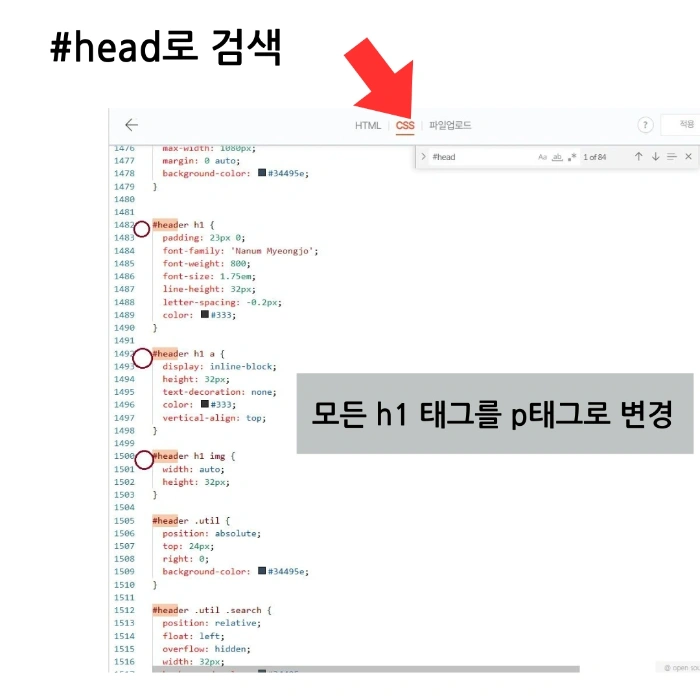
bodytag. It is usually located in the#heador#headersection. Change this H1 tag to aptag. - Linked CSS Modification: If you changed H1 to a P tag in HTML, you must also modify the CSS code. Search for the changed element (e.g.,
#head h1) in the CSS code, modify it to point to the P tag (e.g.,#head p), and apply the style properties (font size, color) that were originally applied to the H1 to the P tag. - Check Mobile Code: When modifying H1 tags, be careful not to omit the code for the mobile skin. If you do not modify the H1 tag on mobile, errors may occur in title buttons. Check and modify the mobile code separately.
Correcting it this way improves optimization issues and shows effects in search engine optimization.
Meta Tags and H1 Tags: Distinction of Roles and SEO Strategy
However, since the H1 tag is the most important for indicating the main content title of the page, using it in duplicate should be avoided. H1 tags establish the structural hierarchy of the page content, while meta tags take on the role of displaying the page title in search results and social shares.
Below are examples of meta tags essential for SEO.
titlePage Title/title !-- Page title (mostly displayed in search results) --

meta name="description" content="A brief description of this page."

meta name="keywords" content="keyword1, keyword2, keyword3"

meta name="author" content="Author Name"

!-- Open Graph Meta Tags (for social media sharing) --

meta property="og:type" content="article" !-- Content type --

meta property="og:title" content="Page title on social media"

meta property="og:description" content="Page description on social media"

meta property="og:image" content="Image URL" !-- Image to be used on social media --

meta property="og:url" content="Page URL" !-- Page URL --

!-- Twitter Card Meta Tags --

meta name="twitter:card" content="summary_large_image" !-- Card type --

meta name="twitter:title" content="Title on Twitter" !-- Twitter title --

meta name="twitter:description" content="Description on Twitter" !-- Twitter description --

meta name="twitter:image" content="Image URL" !-- Image to be used on Twitter --
H1 tags play an important role in SEO, and you should avoid accidentally using dual H1 tags when using blog platforms or writing posts. Correctly setting the page structure helps with search engine optimization and is effective for users to understand the content. Correct H1 usage maximizes crawling efficiency by clearly conveying the topic of the content.
Generally, it is strongly recommended to use only one H1 tag per page for SEO optimization. Multiple H1 tags (dual H1 tags) can confusedly convey the core topic of the page to search engines, potentially negatively impacting SEO.
How can I check for dual H1 tags on a Tistory blog?
You can check the HTML structure in the ‘Elements’ tab by opening the F12 developer tools in your browser, or check the number of H1 tags on the page using SEO analysis tools. In most cases, the blog title (site name) is often hidden as an H1 tag in the skin’s HTML code.
Are there any issues with the original design or SEO if I change the H1 tag to a P tag?
Even if you change the H1 tag to a P tag or another tag, there are no design issues if you apply the same visual style (font size, color, etc.) as the existing H1 through CSS. From an SEO perspective, it is positive to clarify the core topic of the page by removing H1 tags other than the main post title.